


Planning and production
Moodboard vs storyboard: what to approve at each stage of an ad
A moodboard is a board of images that sets a mood: light, materials, colour. A storyboard is a sequence of panels that sets the order of the shots and what happens in each one. So the moodboard vs storyboard question is really about which decision you are making, and a brand can love the colours on the first while rejecting an action on the second. Before you approve anything, ask for the document that settles your current doubt, then write down exactly what you are approving.
In this guide
Milanote defines a moodboard as a collection of visual materials that evoke a particular theme, style or concept. StudioBinder describes a commercial storyboard as a visual outline for an ad spot, with a panel for each shot.
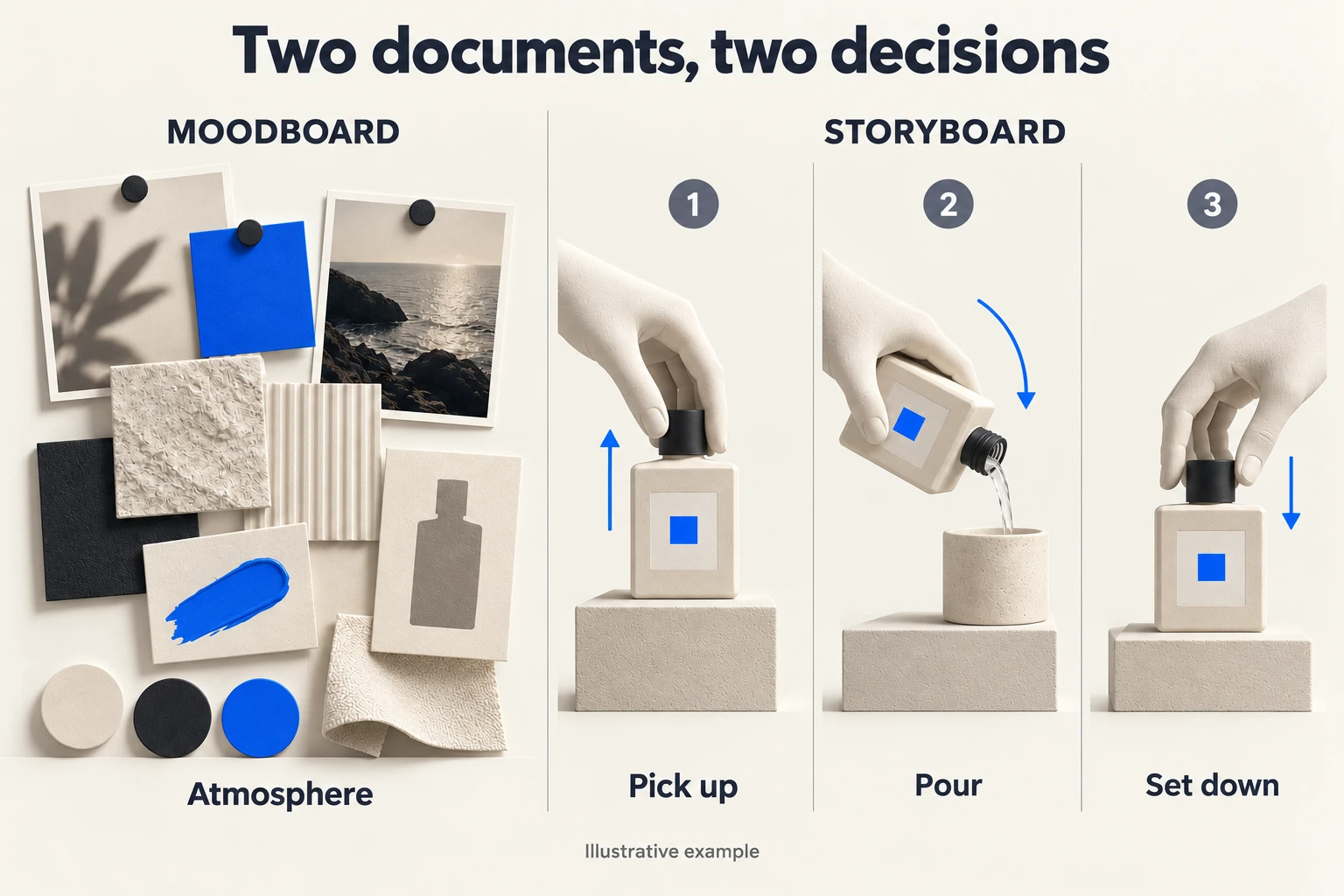
- MOODBOARD STORYBOARD
- 1 2 3
- Colour • texture • light Pick up Pour Set down
- Fictional example: approving a mood does not yet approve these three actions.
Generated teaching maquette · Fictional example. Shapes and relationships illustrate the principle; they are not an optical simulation or a product test.
Earth / Light: a reference for the mood, a list for the order
For our spec film Earth / Light (Terre d’Hermès, 18 s, 9:16), an independent concept made without any commission from the brand, the composition reference showed an amber bottle between a foreground rock and a landscape lit by a low sun. It answered the mood question: mineral texture, warm light, amber glass picking up the colour of the setting. It said nothing about the order of the shots.
That order is written separately, as a sequence of actions: reveal the bottle from behind a rock, vary the scale and the viewpoint, end on a readable product shot with the SPEC AD label. We could have kept the mood and changed the order, or the other way round, without reopening the other decision. The reference and a frame from the edit at 00:04.5 sit side by side on the film’s page.
An office bottle, two questions
The rest of this guide follows an invented case, because it is easier to correct step by step: a brand wants to show a reusable bottle in an office film. The moodboard brings together matte surfaces, side light and a few blue accents. It lets the team discuss how warm the setting feels, whether people are present, and how the object stands out from the background.
It does not say whether someone fills the bottle, carries it or puts it down. All three actions fit the same visual world. The storyboard decides. It proposes three moments: a hand picks up the bottle, pours a drink into a glass and puts it back. Now the brand can see the problem. This model is designed for drinking straight from the bottle, and the pouring scene shows a different use.
The mood works; the action needs another pass. Rejecting the whole moodboard would throw away a decision already made.
Give approval a clear boundary
For the moodboard, talk about what you want to keep: background materials, light direction, how much set dressing, colour treatment. Say what bothers you too. “The setting feels too clinical for this range” gives the team somewhere to go. “It needs more personality” does not.
For the storyboard, check what a viewer understands in each panel. Can they recognise the product? Is the gesture plausible? Does an important object appear before someone uses it? Does the last shot lead to the conclusion you want?
One sentence is enough to set the boundary: “Mood and palette agreed; the opening gesture still needs work.”
What a still image leaves open
Even a detailed storyboard cannot make you hear a voice, a breath or a piece of music. It shows that something moves, not how fast. If your doubt is about the speed of a transition, ask for the panels cut together on a timeline, in other words a rough animatic.
The reverse also holds: there is no need to cut a sequence to choose between two background materials. Two still frames side by side will do.
Follow the decision through three documents
Back to the office bottle. The team receives this note: “We like the calm blue world, but the film must show someone drinking straight from the bottle.” The answer keeps the mood and fixes the gesture.
| Document | What it contains for this film | Decision recorded |
|---|---|---|
| Moodboard M2 | Matte desk, soft side light, blue chair, uncluttered background | Keep the office mood; the blue belongs to the set, not to a new bottle variant |
| Storyboard S2 | Bottle on desk; hand opens the actual closure; person drinks; bottle returns beside the notebook | Replace the pouring action; keep the opening visible |
| Rough animatic A1 | Those panels with a temporary breath, closure sound and pauses | Check whether the opening gets enough time; sound choices stay provisional |
Now suppose the animatic feels slow. Cutting the panel that shows the opening would shorten it, but it would also remove the information the storyboard was meant to protect. Shorten the pause after the drink first. If that is not enough, reopen S2 knowing what you are giving up: the visible opening.
Use an approval note that survives a forwarded email
“M2 mood retained. S2 actions approved for preparation, including drinking from the bottle and a visible manual opening. A1 timing to revise after the drink. Final product texture, performance and sound still to approve.” Attach the named versions.
If someone later asks for a night scene, the team knows M2 is what changes. If they want pouring instead of drinking, S2 changes. Nothing else moves.
An exercise before your next review
Write one sentence beginning “We need to decide…”. If it concerns atmosphere, request annotated references. If it concerns an action or sequence, request ordered frames. If it mixes both, separate the decisions before commenting.
Guide prepared by PIRAXE with the help of AI tools, based on the sources cited. Examples are illustrative, not client results.